ClevePython structure
This page is a beginning — the direction for 2027, not a finished reference. ClevePython mirrors the SG-Lib data structures one to one, so everything you know from MATLAB® carries over directly. See also SG-Lib 2027 — moving to Python.
MATLAB is a registered trademark of The MathWorks, Inc. This ClevePython project is independent of and is not affiliated with or endorsed by MathWorks.
Why identical output matters for learning
For students the hardest part of starting with MATLAB is rarely the mathematics — it is the unfamiliar syntax and the way results appear on screen. ClevePython removes that barrier: not only the syntax but, above all, the screen output looks the same under Python as in MATLAB. A struct prints the same way, a contour or a solid is drawn the same way.
This gives users an easy on-ramp in both directions. Someone who learns in Python moves to MATLAB without relearning; a MATLAB user finds everything familiar in Python. Along the way they see the real advantage of the compact, matrix-first syntax instead of fighting unfamiliar notation.
Crucially, this includes the integrated graphics output that came with the SG-Lib: calling a function without catching its result automatically draws the figure (the nargout==0 idea, in the spirit of Cleve Moler’s teaching style). ClevePython keeps exactly this — the same command produces the same picture, as the finger example on the Python page shows. Syntax, text output and the automatic figure together are what make the entry easy and the advantages visible.
Same structure, same syntax — in code as in the console
A solid is the same struct in both worlds. A = SGbox returns the identical fields — vertex list VL, facet list FL, frame names Tname, the 4x4 transforms T and the per-frame facet lists TFiL:
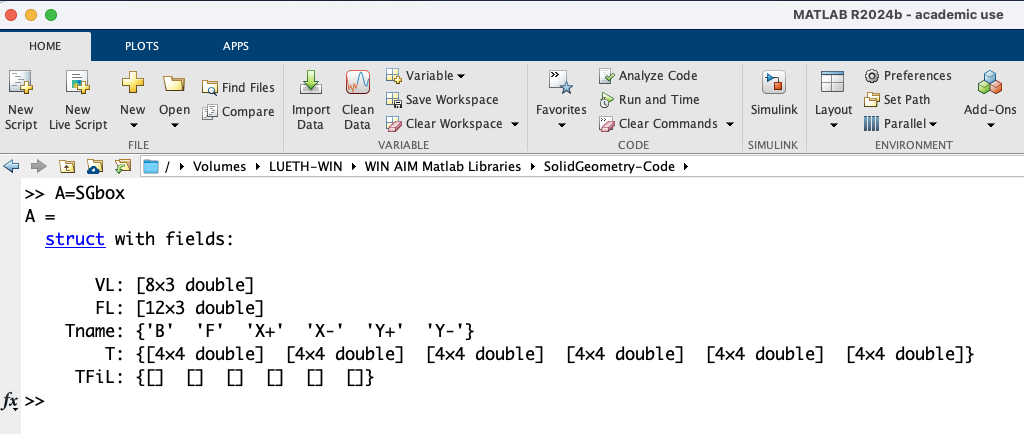
A = SGbox, today's SG-Lib 5.6.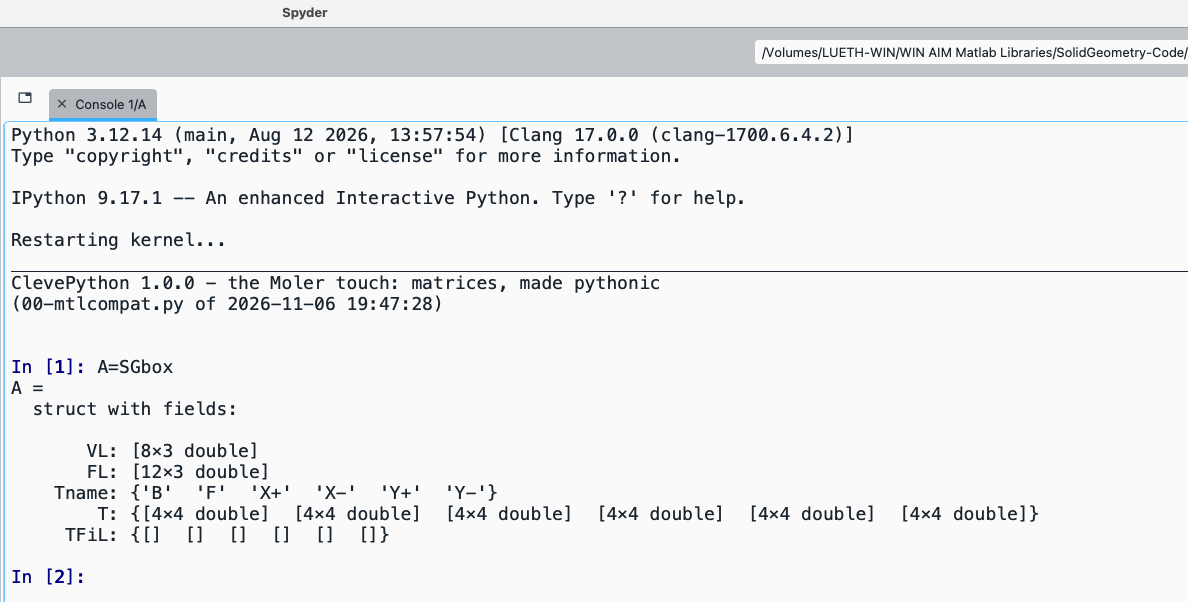
A = SGbox in Python, same fields, same shapes.Same command, same result: a struct with VL [8x3], FL [12x3], Tname, T {6x 4x4} and TFiL.
The same syntax applies in the editor as in the console — with CleveSpyder you can compare both directly next to MATLAB.
The data types
The SG-Lib builds everything from a small set of plain data structures, and each function name signals its return type through its first letters. ClevePython keeps the same names and the same shapes:
- PL — 2D point list · VL — 3D vertex list
- CPL — closed contour list (sub-contours separated by a
[NaN NaN]row) · CPLR — cell array of link contours - FL — facet list · VLFL — a vertex/facet surface
- SG — a solid (a struct of
VL/FL, as shown above) · T / TL — frame / transformation lists
In the medium term, SG-Lib will not follow the object-oriented route of classes such as MATLAB’s polyshape/polybuffer. Instead it puts the numerics back at the centre — plain arrays and structs, exactly like MATLAB up to 2016 — to keep the code fast and numerically traceable and correct, and to deliver data that is easy to pass on to other packages.
Still to come
This page will grow into the ClevePython counterpart of the SG-Lib Structure chapter tree. For now it shows the core promise: the structures are identical, so MATLAB knowledge and MATLAB code transfer to Python unchanged.
A first multibody-dynamics example — a sphere dropping onto an SG-Lib plate (SGbox), simulated with ClevePython / SG-Lib / PyChrono:
The whole multibody simulation runs without Simulink or Simscape and in the same graphics window as the geometry. The same motion can also be exported as a Blender animation. The designer describes the kinematics, mechanics, geometry and degrees of freedom in code — there are no interactive lines or blocks left to wire by hand. And together with AI agents such as Claude, ChatGPT Codex or Claude Code, new complex interfaces and combinations of interfaces can be built in a fraction of the time.
SolidCraft — visualisation and interactive motion
A first example of coupling SG-Lib kinematics to SolidCraft: a kinematic chain described in code — and, where wanted, generated automatically by SG-Lib synthesis — is visualised there and can be moved interactively. Here a JACO robot arm guides its end-effector along a prescribed elliptical path; the attached coordinate frame (red/green) shows the tool orientation.
Blender — synthesised kinematics rendered
The same idea for rendering: a four-bar linkage (truss) is designed in the SG-Lib — link contours and joint points —, exported through SGwriteSTL with the Materialise/MAGICS colour convention (COLOR=RGBA,MATERIAL=…) as a coloured STL, and animated in Blender. On the left the synthesis in the SG-Lib graphics, on the right the same four-bar as a Blender rendering.